
01
Send a payment link
Request a deposit, booking fee, security deposit authorization, balance or full payment by text or email. The customer follows a secure flow without an account and you receive confirmation.
PayLinker brings together payment links by text or email, online ticketing with QR codes and card security deposits. Get paid, track payments and check admissions from one clear interface.
Real demo of the app with prefilled access and no account creation needed.
Your customers can pay in seconds, on mobile or desktop.
Secure payments powered by Stripe.

Accepted payment methods: Your customers can pay in seconds, on mobile or desktop.. Secure payments powered by Stripe.
Real flow

Amount
EUR 120.00
Reason
Service balance
Channel
SMS + email
Secure payment
The customer pays without an account, on a secure page.
Request a direct payment from a customer or publish an event to sell multiple tickets. PayLinker centralizes payment, tracking and confirmations.
01
Request a deposit, booking fee, security deposit authorization, balance or full payment by text or email. The customer follows a secure flow without an account and you receive confirmation.
02
Create events for free, add tickets, share the sales page and check entries with a unique QR code.
Present your event, show available tickets and receive orders from a mobile-friendly page.

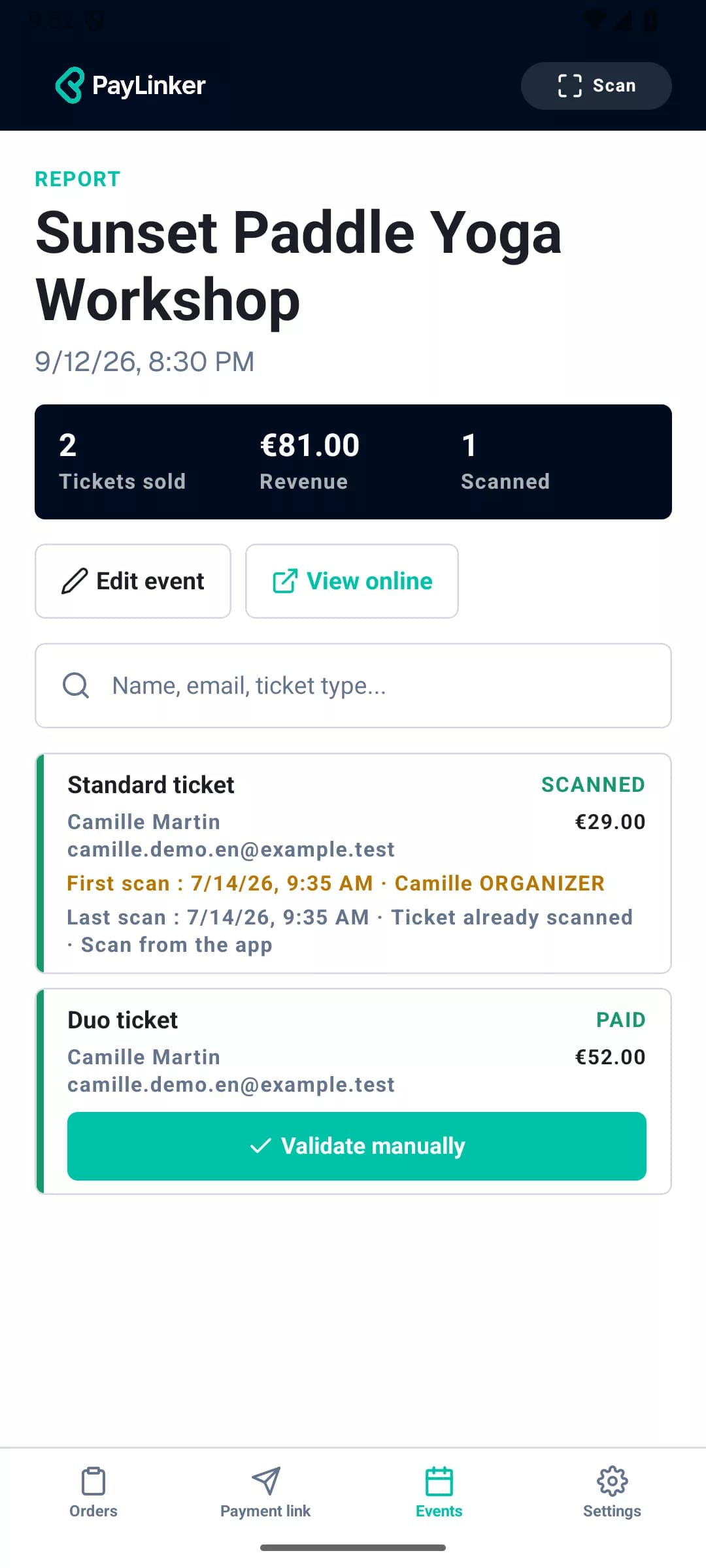
Each ticket has a unique QR code. PayLinker checks payment, event and ticket history, then flags a second scan immediately.
Discover QR-code checksPayLinker mobile app
The PayLinker app is currently in testing. It will let you create and track payments, manage events and check tickets from a phone.
Coming soon on iOS and AndroidOnline security deposit
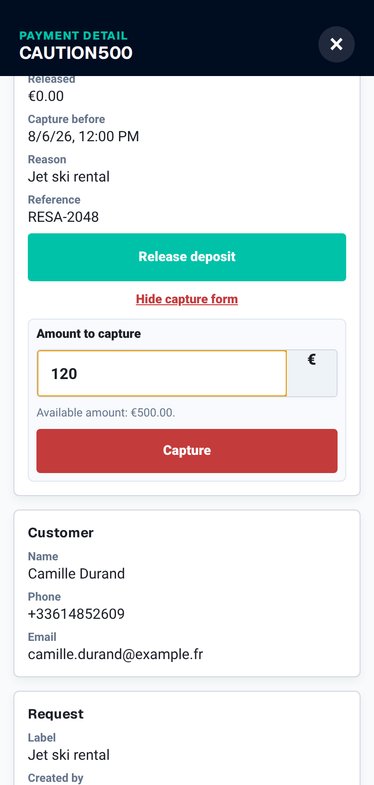
For rentals, equipment or key handover, PayLinker lets you request a clear card authorization before the service. Customers do not need an account, and you stay in control.
Stripe
Stripe cancels uncaptured authorizations after a period, 7 days by default. PayLinker shows the exact date after authorization.

Quick paths
Start with the scenario that matches your business. You will land directly on the page built to explain, reassure and convert.
PayLinker dashboard
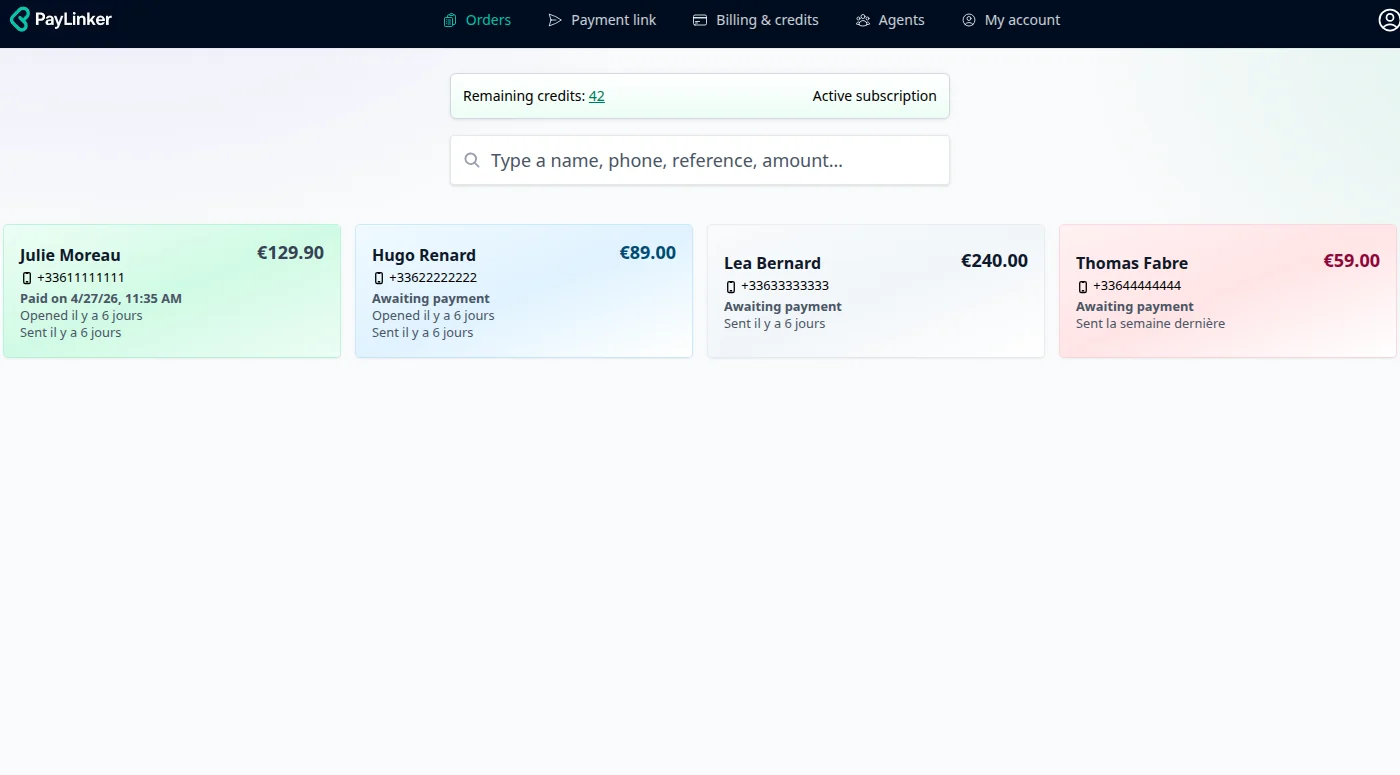
From the interface, you create the link, see whether the request was sent, opened, pending or paid, and the seller gets an email confirmation as soon as the customer pays.
Product demo
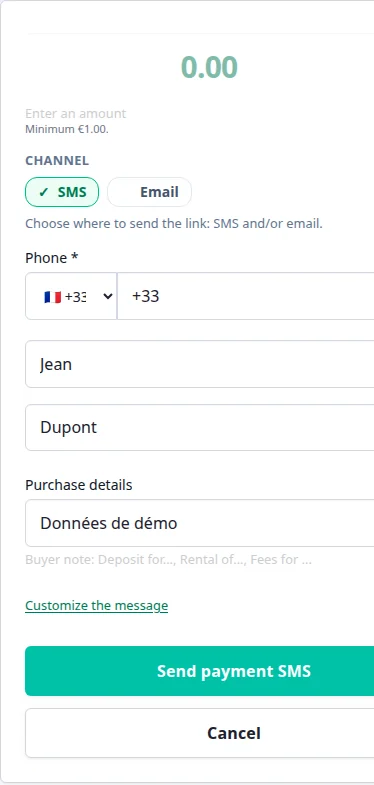
From PayLinker, choose the amount, the purpose and the delivery channel. Your customer pays through Stripe; you instantly see the status, the receipt and the payment history. SMS when speed matters, email when you want a more formal request.
Example SMS sent
[Your Business] – Your secure payment link: pay.linker/ABC123. Please pay 120,00 € to confirm your appointment.
Live PayLinker demo
The link is unique, secure and works on smartphone, tablet or computer. Once the payment is completed, a receipt is automatically generated.
You see the real product flow before creating your account.
PayLinker is useful whenever you need to confirm a date, secure a slot, protect a rental or collect payment before a visit. It is especially effective when a no-show or a late payment costs real money.
Payments are processed on Stripe’s PCI-DSS-certified infrastructure. Funds land directly in your Stripe account, while PayLinker handles the link, the status and the receipt without ever seeing card numbers.
Example Stripe fees (France)
These are indicative fees based on Stripe’s public pricing in France consulted on July 30, 2026. Actual fees may vary. Always refer to Stripe’s official pricing page for up-to-date information and your specific account conditions.
You pay Stripe’s banking fees on each transaction. PayLinker does not add any hidden fees.
A short PayLinker demo (about 1 minute).
Amounts paid for the PayLinker subscription and SMS credit packs are non-refundable, except where required by law or for a malfunction solely attributable to PayLinker. If you have an issue or concern with an invoice, you can contact support at contact@paylinker.fr; we review each request on a case-by-case basis and may offer a credit or goodwill gesture if needed.
You can stop the PayLinker subscription at any time from your PayLinker customer area, under “Billing / Subscription”. Cancellation takes effect at the end of the current period: you keep PayLinker subscription features until then, and billing stops after that, except for any SMS credit usage.
Deposit, booking fee, security deposit or full payment: collect payments remotely without a terminal, with clear tracking and automatic receipts.
Payment links sent by SMS or email help professionals get paid remotely without a card terminal. This is ideal for service businesses, bookings, deposits, and appointments. Unlike traditional terminals, a payment link requires no hardware. The customer receives a secure link, opens it, and pays online from a phone or computer. To see the full flow, visit how it works. This approach is used to collect deposits, confirm bookings, charge remotely, and reduce unpaid invoices or last-minute cancellations. Details about plans are available on pricing.
PayLinker is used by professionals who want a simple and fast way to collect payments. Tradespeople use it to request a deposit before a job. Beauty and wellness businesses use it to secure appointments. Sports clubs, leisure activities, and rental services also use payment links to confirm bookings and reduce no-shows. Explore industry use cases on sectors, for example beauty services or sports and leisure.
Invite up to 10 agents (subscribers) to create and send payment links in seconds, even on the go. Each agent can send payment requests and track incoming payments in real time: reminders, paid status, automatic receipts — all within the same organization.
Payments sent with PayLinker are processed by certified payment infrastructure. Customers’ card details are never stored on the professional’s website. Each payment link is secured and lets customers pay with confidence. A confirmation is sent after payment, providing clear traceability for both the professional and the end customer.