

PayLinker
Payment links • SMS & email

Payment links by SMS or email to get paid without a terminal

A payment link lets you get paid remotely without a card terminal or app. Sent by SMS or email, it opens a secure checkout page to collect a deposit, a booking fee, a security deposit, a remaining balance or a full payment.

  • Get paid without a terminal, even remotely
  • SMS or email depending on the customer
  • Secure Stripe checkout
  • Deposits, booking fees, security deposits or balances

The live demo is available without signup. If you are ready, create your account and connect Stripe.

Real flow

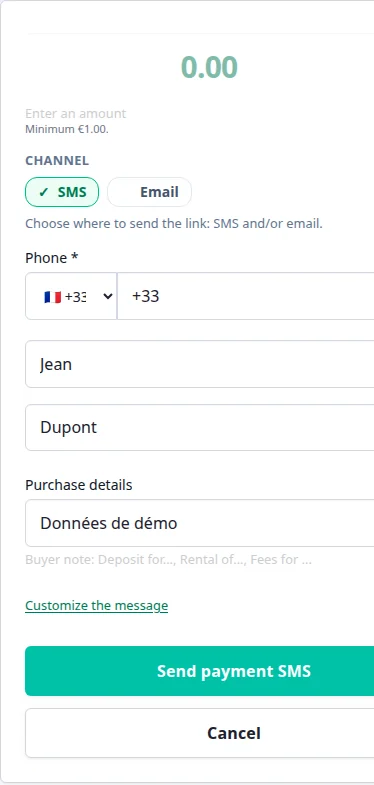
Create a payment link

PayLinker

Amount

EUR 120.00

Reason

Service balance

Channel

SMS + email

Send link

What your customer receives

Hello, here is the secure link to pay for your service. pay.linker/ABC123

Secure payment

The customer pays without an account, on a secure page.

Payment received
Instant confirmation+ EUR 120.00

When should you use a payment link?

Payment links are used to get paid before, during or after a service. They are ideal when you work on bookings, cannot use a card terminal on site, or need to collect payment before travelling, before arrival or before delivery.

Use them to collect a deposit to secure a slot, a booking fee to confirm a date, a security deposit before key handover, or a balance payment to avoid chasing clients afterwards.

Common uses:
What payment links change in practice

You get paid earlier

You get paid earlier instead of waiting for a bank transfer, a cheque or a payment “later”.

You secure dates and visits

You secure bookings, visits and rentals with a payment request sent at the right moment.

You spend less time chasing

You spend less time chasing payments because the link is simple, direct and trackable.

You stay professional

You keep a more professional image with a secure payment page powered by Stripe.

You choose the right channel

You use SMS or email depending on urgency, context and customer expectations.

Payment security you can trust

Transactions are encrypted and processed on Stripe’s infrastructure, with a clear confirmation for you and your customer.

Stripe payment security

See an example in health & beauty services.

This is the right entry page if…

The payment link page is the right starting point when you simply want to get paid remotely. If your use case is very specific, a dedicated page will convert better.

Use this page if…

  • you want to collect a balance or full payment without a terminal
  • you are still deciding between SMS and email for the customer
  • you want the broad product view before signing up

Payment link pricing

Creating a payment link is free. Only the transaction is subject to the PayLinker fee depending on your plan, plus Stripe fees. Each SMS uses 1 credit, while email delivery stays free.

see pricing

See an SMS payment in video

PayLinker demo (~1 minute): create the link, send by SMS, get paid.

FAQ

What is a payment link?

It’s a secure payment URL you send to a customer to pay online, without a terminal or app.

Can you send a payment link by SMS?

Yes. Send it by SMS (1 SMS = 1 credit) or by email for free.

Does the customer need to create an account?

No, payment is completed in seconds without account creation.

Are payments secure?

Yes. Transactions run through Stripe and funds are paid directly to your business account.

Can I collect a deposit or booking fee with a payment link?

Yes. Payment links work for deposits, booking fees, security deposits, or full payments.

Ready to get paid without a terminal or endless follow-ups?

A clear payment link sent by SMS or email at the right time is often what turns “I’ll pay later” into a completed payment.