
PayLinker
Security deposit • Online

Online security deposit for rentals, equipment and bookings

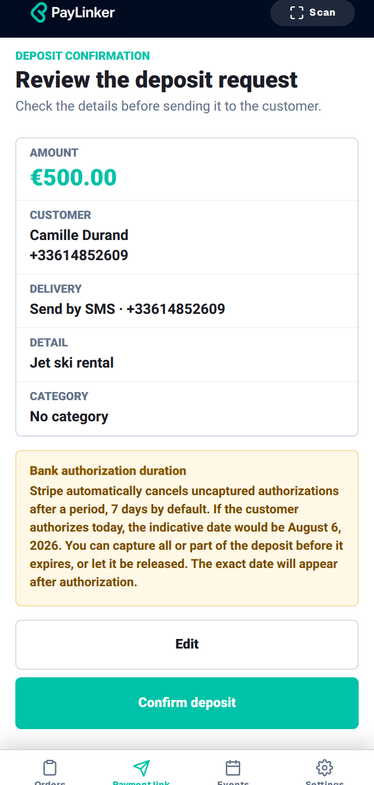
An online security deposit helps you protect a rental, equipment handover, venue booking or service with a clear advance payment. With a payment link, you request the deposit remotely without a card terminal, with time-stamped proof and an automatic receipt.

  • Request a deposit remotely
  • Secure online payment (Stripe)
  • Time-stamped proof and automatic receipt
  • Great for rentals and events

Security deposit • Online

How to request a deposit with PayLinker

How it works

  1. 1.Create a “deposit” link (amount, reason, customer).
  2. 2.Send it by SMS or share it online.
  3. 3.Customer pays on a secure Stripe page.
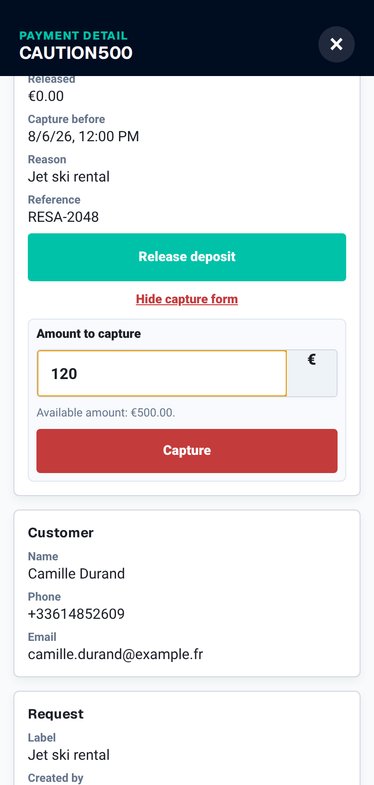
  4. 4.You get confirmation + receipt; refund according to your policy when applicable.

SMS example (deposit)

Hi, to finalise the booking, here is the secure link to pay the security deposit: pay.linker/ABC123. Thank you.

Short message, clear link, secure payment.

Why request an online security deposit before handover

A deposit sets expectations: it reminds customers there is responsibility (damage, late return, missing items). For professionals, it reduces disputes and grey areas. Note: a security deposit is a guarantee, not a fee. It can be refunded according to your policy (return condition, inspection, etc.).

With PayLinker, you send a payment link (by SMS or online). The customer pays on a secure Stripe page. You get instant confirmation and an automatic receipt. Your refund and return policy remains yours.

What an online security deposit protects in practice

Equipment rentals

Collect the deposit before handover: bikes, jet-skis, sound gear, tools… → See also: Deposit by SMS (to secure a slot): /en/deposit-by-sms

Short-term rentals

Deposit and booking fee remotely, then balance before arrival if needed. → To confirm a booking: Booking deposits by SMS: /en/booking-deposit-by-sms

Events

Deposit for a venue, equipment or service: clear framework before the event. → Create a generic link: Payment link: /en/payment-link. Sector example: sports & leisure.

How to request a deposit with PayLinker

  1. 1. Create a “deposit” link (amount, reason, customer).
  2. 2. Send it by SMS or share it online.
  3. 3. Customer pays on a secure Stripe page.
  4. 4. You get confirmation + receipt; refund according to your policy when applicable.

Don’t mix them up: deposit vs booking fee vs down payment

Depending on your activity, you may combine a security deposit with a booking fee or a down payment. The key is clarity: purpose, amount and terms. These pages help. Reference (UK): official guidance on tenancy deposit protection: tenancy deposit protection (GOV.UK).

Helpful pages:

FAQ – Online security deposit

Is an online security deposit charged or just held?

With PayLinker, the deposit is paid via a secure link. Refunds follow your policy.

Can I request the deposit by SMS?

Yes. Sending by SMS is available (1 SMS = 1 credit).

Does the customer need an account?

No, customers pay on a secure page, without an account.

How do I prove a deposit was paid?

You receive a confirmation and a receipt.

Deposit vs booking fee vs down payment: how to choose?

Security deposit = guarantee. Booking fee/down payment = reservation commitment. See dedicated pages.

Ready to secure your rentals and handovers?

A clearly explained online security deposit reduces back-and-forth, protects equipment or property handover, and speeds up confirmations without a terminal.